 14eb43211d
* initial changes for waveshare s3 touch support

* fix lvgl locking

* fix for lvgl locking

* cleaned up dependencies

* boards now depend on tactility instead of tactility-esp

* revert deletion

* remove component

* working touch&display driver

* added waveshare to github actions

* cleanup

* fix for driver

* fix for sim build

* build fixes

* updated docs

* updated docs

* attempt new sdl2 github action

* revert

* fixes for clion/cmdline build

environment wasn't parsed properly

* temporarily disable pc sim build
3.4 KiB
Overview
Tactility is a front-end application platform for ESP32. It is mainly intended for touchscreen devices. It provides an application framework that is based on code from the Flipper Zero project.
Status: Alpha
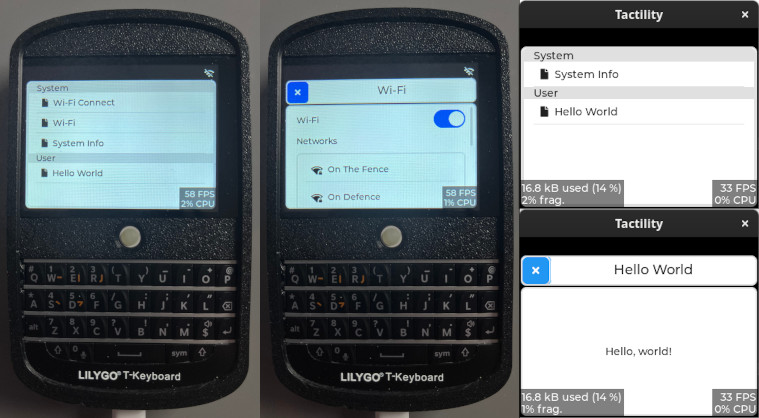
Tactility features:
- A hardware abstraction layer
- UI capabilities (via LVGL)
- An application platform that can run apps and services
- PC app support to speed up development for ESP32 apps
Requirements:
- ESP32 (any?) with a display that has touch capability
- esp-idf 5.1.2 or a newer v5.1.x
Technologies
UI is created with lvgl. Any LVGL-capable device is supported.
In general, esp_lvgl_port is the preferred solution if it supports your hardware: Those LCD and input drivers are based on esp_lcd and esp_lcd_touch. They are generally available via the Espressif Registry: here and here
Supported Hardware
Devices
Predefined configurations are available for:
- LilyGo T-Deck (see lilygo.cc, AliExpress)
- Waveshare S3 Touch LCD 4.3 (docs)
- Yellow Board 2432S024C: a 2.4" display with capacitive touch (see AliExpress 1, 2)
- (more will follow)
Other configurations can be supported, but they require you to set up the drivers yourself.
Guide
Build environment setup
Ensure you have esp-idf 5.1.2 installed, then select the correct device:
Copy the sdkconfig.board.YOUR_BOARD into sdkconfig. Use sdkconfig.defaults if you are setting up a custom board.
Building firmware
You can run idf.py flash monitor, but there are some helpers available too:
./build.sh - build the ESP-IDF or the PC version of Tactility (*)
./build.sh -p /dev/ttyACM0 - optional: you can pass on extra parameters for esp-idf builds
./run.sh - Does flash and monitor for ESP-IDF and simply builds and starts it for PC
The build scripts will detect if ESP-IDF is available. They will adapter if you ran ${IDF_PATH}/export.sh.
Development
Directories explained:
app-esp: The ESP32 application exampleapp-sim: The PC/simulator application exampleboards: Contains ESP modules with driverstactility: The main application platform code (src/)tactility-esp: ESP-specific application code (e.g. wifi app and service)tactility-core: Core functionality regarding threads, stdlib, etc. (src/)libs: Contains a mix of regular libraries and ESP modules
Until there is proper documentation, here are some pointers: