
4.5 KiB
Overview
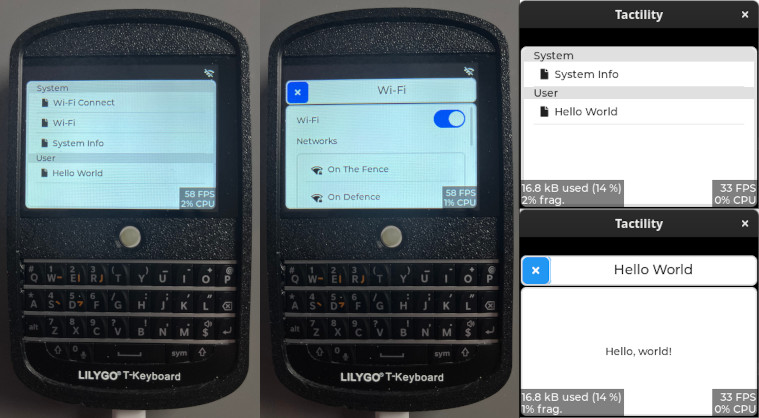
Tactility is a front-end application platform for ESP32. It is mainly intended for touchscreen devices. It provides an application framework that is based on code from the Flipper Zero project.
Status: Alpha
Noteworthy features:
- Touch UI capabilities (via LVGL) with support for input devices such as on-device trackball or keyboard.
- An application platform that can run apps and services.
- Basic applications to boost productivity, such as a Wi-Fi connectivity app.
- Run Tactility apps on PC to speed up development.
Requirements:
- ESP32 (any?) with a display that has touch capability
- esp-idf 5.1.2 or a newer v5.1.x
Making apps is easy!
Apps are described in "manifest". The manifest provides some basic information on the app name and icon, but also tells Tactility what needs to happen when the app runs.
UI is created with lvgl which has lots of widgets! Creating a touch-capable UI is easy and doesn't require your own render loop!
static void app_show(TT_UNUSED App app, lv_obj_t* parent) {
    lv_obj_t* label = lv_label_create(parent);
    lv_label_set_text(label, "Hello, world!");
    lv_obj_align(label, LV_ALIGN_CENTER, 0, 0);
    // Widgets are auto-removed from the parent when the app is closed
}

const AppManifest hello_world_app = {
    .id = "helloworld",
    .name = "Hello World",
    .icon = NULL,
    .type = AppTypeUser,
    .on_start = NULL,
    .on_stop = NULL,
    .on_show = &app_show,
    .on_hide = NULL
};
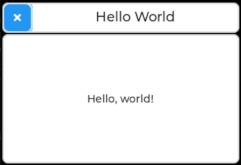
This shows as follows:
Supported Hardware
Any ESP32 device with a touch screen should be able to run Tactility, because LVGL is set up in a platform-agnostic manner. Implementing drivers can take some effort, so Tactility provides support for several devices.
Predefined configurations are available for:
| Device | Screen&Touch | SD card | Other |
|---|---|---|---|
| LilyGo T-Deck | ✅ | ✅ | Keyboard |
| Waveshare S3 Touch | ✅ | ⏳ | |
| Yellow Board 2432S024C (*) | ✅ | ✅ |
- ✅: Capable and implemented
- ⏳: Capable but not yet implemented
- ❌: Not capable
(*) Note: Only the capacitive version is supported. See AliExpress here and here.
Guide
Build environment setup
Ensure you have esp-idf 5.1.2 installed, then select the correct device:
Copy the sdkconfig.board.YOUR_BOARD into sdkconfig. Use sdkconfig.defaults if you are setting up a custom board.
Building firmware
You can run idf.py flash monitor, but there are some helpers available too:
./build.sh - build the ESP-IDF or the PC version of Tactility (*)
./build.sh -p /dev/ttyACM0 - optional: you can pass on extra parameters for esp-idf builds
./run.sh - Does flash and monitor for ESP-IDF and simply builds and starts it for PC
The build scripts will detect if ESP-IDF is available. They will adapter if you ran ${IDF_PATH}/export.sh.
Development
Take a look at the App Lifecycle.
Directories explained:
app-esp: The ESP32 application exampleapp-sim: The PC/simulator application exampleboards: Contains ESP modules with driverstactility: The main application platform code (src/)tactility-esp: ESP-specific application code (e.g. wifi app and service)tactility-core: Core functionality regarding threads, stdlib, etc. (src/)libs: Contains a mix of regular libraries and ESP modules
Until there is proper documentation, here are some pointers: